OpenGPU connects distributed power to this growing demand.

Connect your Windows PC.
Activate your GPU.
Strengthen your position
in the network.

AI is scaling exponentially — models train 24/7. GPUs have become a strategic digital resource. OpenGPU Network aggregates distributed GPUs worldwide and connects them to real demand from mining and AI compute.

Global demand is shaped by NVIDIA and the cloud infrastructure layer (AWS, Google Cloud, Microsoft Azure). AI development is being accelerated by labs building the next generation of models.
DOWNLOAD for Win

Free OpenGPU App

Live Network Status

10K+

Participants

10K+

Active GPUs

$32K+

Distributed in the last 24 hours

Network is in the scaling phase

Community formation is complete.

The network is now moving into rapid growth — toward hundreds of thousands of GPUs.

DOWNLOAD for Win

Free OpenGPU App

Participation Model

01

1 GPU = $1.5 per day (at current network turnover).

02

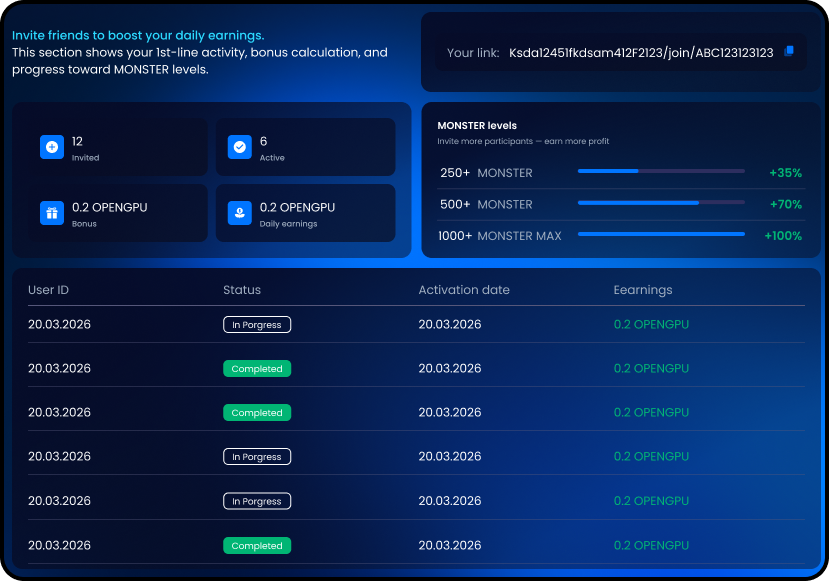
+0.1 to your coefficient for each active 1st-line GPU (active in the last 24 hours).

03

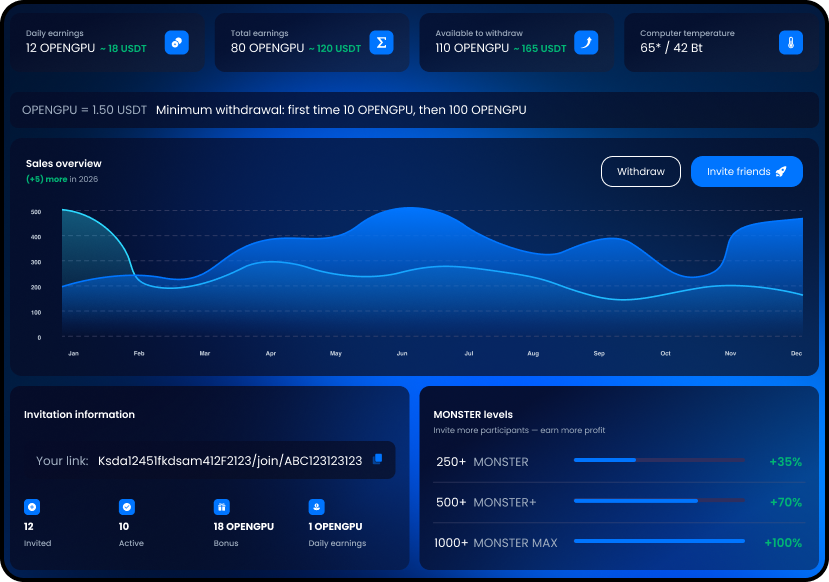
MONSTER levels (additional boosts)

  • 250+ GPUs → MONSTER: +35%

  • 500+ GPUs → MONSTER: +70%

  • 1000+ GPUs → MONSTER MAX +100%

You increase your share through scale and activity.

DOWNLOAD for Win

Free OpenGPU App

Why you shouldn’t delay

Joining later may still be possible — but it won’t be an early position.

Positions in distributed networks are formed early.

Coefficients are strengthened by activity.

As the network scales, competition for share increases.

Right now

The infrastructure is proven, 10,000+ participants have formed the base, and accelerated scaling is starting.

DOWNLOAD for Win

Free OpenGPU App

Who OpenGPU is for

One platform — different growth strategies. DOWNLOAD For Win

DOWNLOAD for Win

Free OpenGPU App

Individuals

Connect a Windows PC and participate independently.

Influencers

Scale 1st-line growth and increase their coefficient.

GPU farms & businesses

Connect 250+ devices and access expanded conditions.

Available now

Windows PC app

Fast installation

GPU support

Dashboard & statistics

DOWNLOAD for Win

Free OpenGPU App

OGPU token roadmap

At that milestone, the plan includes:
  • Expanding OGPU token utility
  • Preparing for external listing
  • Increasing token liquidity
  • Adding more use cases inside the ecosystem

A listing enables additional circulation mechanisms beyond the platform. Participation may evolve from daily distribution to long-term token ownership within the ecosystem.

Secure your position before the next scaling phase. OpenGPU Network is next-generation distributed compute infrastructure.
DOWNLOAD for Win

Free OpenGPU App

FAQ

Quick answers about mining, earnings, referrals, and withdrawals.

How do I start mining?

Mining starts automatically when you open the OpenGPU Network app on your Windows PC. If your device meets the safety requirements (power/temperature), the network begins processing right away.

How much can I earn per day?

Base earnings are $1.5/day per active GPU (at current network turnover). Your daily result increases with active 1st-line referrals and can be boosted further by MONSTER levels.

How do referral bonuses work?

For each active 1st-line referral, you receive a +10% bonus on the base rate, which equals +0.1 to your coefficient per active referral. More active referrals = higher daily earnings.

What is the MONSTER program?

MONSTER is a level system that boosts your share as your 1st-line network scales:

  • 250+ GPUs → MONSTER: +35%
  • 500+ GPUs → MONSTER+: +70%
  • 1000+ GPUs → MONSTER MAX: +100%

Who counts as “active” in my 1st line?

A referral is considered active if they have been mining within the last 24 hours (i.e., their app has been running and contributing to the network).

When can I withdraw?

Withdrawals are available once you reach the minimum threshold: 10 OPENGPU for your first withdrawal, then 100 OPENGPU for all next withdrawals.

Which wallet/network is supported for payouts?

Payouts are sent to a USDT TRC20 wallet address. Always double-check you’re using the TRC20 network before confirming.

Where can I get help if something doesn’t work?

Open the Help/Logs section in the app to find answers and diagnostics. If the issue remains, contact support using the details on the website and include your User ID and copied logs for faster help.

DOWNLOAD for Win

Free OpenGPU App